What AWS Emulator's fidelity scores mean for your tests
AWS now ships a free local emulator for its APIs. Here is how it works, what its per-service fidelity scores tell you, and where it can mislead you.
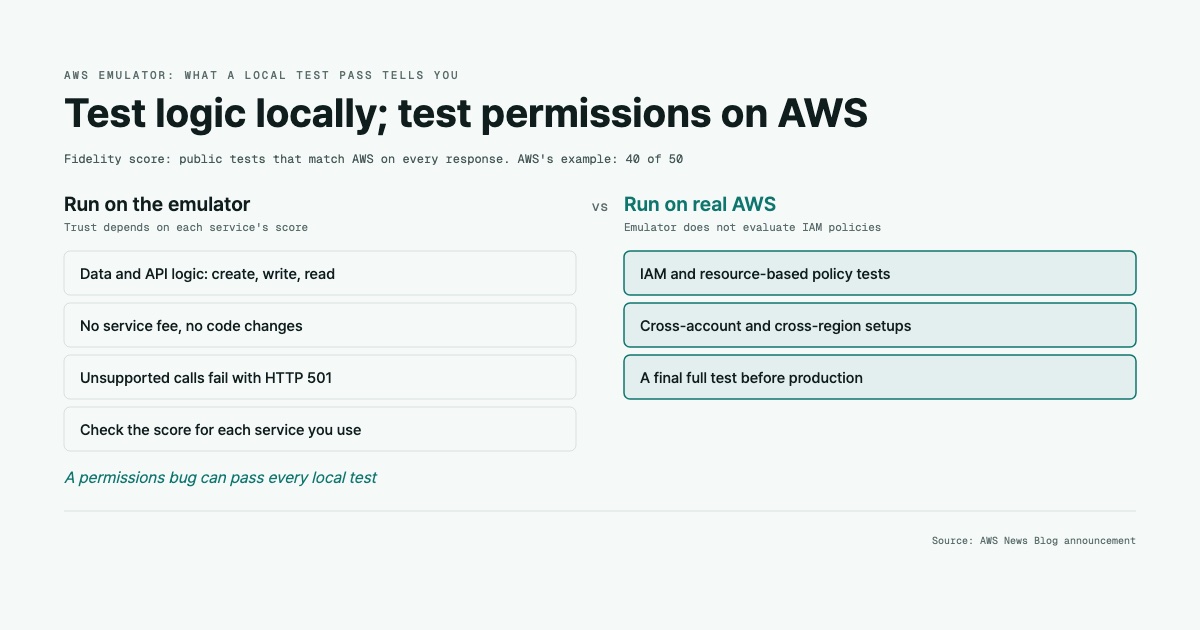
AWS has released AWS Emulator, a program that runs on your machine and answers AWS API calls locally, according to the AWS News Blog announcement. You point the AWS CLI, the AWS SDKs or a coding agent at a local HTTPS endpoint, and your application code stays the same. One detail decides how far you can trust it. With each release, AWS publishes a per-service fidelity score: how many public tests pass out of the total. A test passes only if the emulator matches real AWS on every response.
The background you need
When your code talks to AWS, it sends HTTPS requests to an endpoint, the web address for a service in a given region. The SDK is the library you call from your code, such as the SDK for Python or Java. The CLI is the aws command in your terminal. Both build those requests for you.
Testing code that talks to AWS usually leaves you two choices. The first is a real AWS account. That is accurate, but it is slow, it can cost money, and you have to clean up afterward. The second is mocks: fake responses you write yourself. Mocks are fast, but they only confirm what you already assumed the service would do. An emulator sits between the two. It is a program that implements a service’s API on your machine and keeps state, so a table you create still exists when you write to it.
AWS describes each service’s API in machine-readable API models. These are written in a modeling language called Smithy and published on GitHub. The SDKs are generated from these models. According to AWS, the emulator is built from the same models. So your requests, and the errors you get back, have the same shape as on AWS.
Think of an API model as a restaurant menu. It tells you which dishes exist and how each plate looks when it arrives. It does not tell you how the kitchen cooks. The analogy breaks in one place: the emulator does have a kitchen. It really creates buckets and tables. Whether its cooking matches AWS’s is a separate question, and that is what the fidelity tests measure.
A few more terms you will see:
- SigV4 (Signature Version 4) is how AWS requests are signed with your keys, so the service knows who sent them.
- IAM (Identity and Access Management) is AWS’s permission system. Its policies decide whether a signed request is allowed.
- HTTP 501 means Not Implemented: the server knows the request but does not support it.
- Coding agents are AI tools, such as Kiro or Claude Code, that write code and run commands for you.
What actually changed
According to AWS, the emulator is generally available now and has no additional service fee. On Linux you install it from RPM or Debian packages. On macOS and Windows you build a Docker image from a short Dockerfile in the documentation. AWS says it does not publish a ready-made image. You can also build from source.
When it starts, it creates its own credentials, a config file and a certificate under ~/.aws/emulator/9297/. It serves HTTPS on 127.0.0.1:9297, so only your own computer can reach it. You set a handful of environment variables, such as AWS_ENDPOINT_URL, so the CLI and SDKs talk to your laptop instead of AWS. It generates new keys on every start. Its access key IDs begin with EMULATOR, and it rejects requests signed with any other keys. It acts as a single account, 000000000000. It requires SigV4 signing like AWS does, and it exposes a /__admin/health endpoint, so a script can wait until it is ready.
AWS also describes an embedded mode. You run the emulator inside your test process instead of as a separate server. Each instance keeps its own state, so tests can run in parallel without sharing buckets or tables. At launch, embedded mode is available only for the AWS SDK for Rust.
AWS says the emulator is written in Rust to stay light on a laptop. It is built and maintained by AI agents working from the AWS API models. One group of agents finds gaps and files issues. Another group writes fixes, and a separate security agent reviews changes before release. By default, the emulator sends anonymous usage and error data, which you can turn off.
Then there is the measurement. AWS writes fidelity tests: short SDK programs that run a workflow, such as storing an object, reading it and deleting it. Each test is verified against real AWS. The test suite is public in the aws-emulator-evaluation-suite repository, including tests that do not pass yet. If an operation is not implemented, the emulator returns HTTP 501, so your test fails right away instead of passing by accident.
What it means for you
The fidelity score is the number to read first. AWS’s own example is 40 of 50, which means 10 of that service’s workflows still differ from AWS somewhere. The pass bar is strict. The status code, the body, the exact error code and message, and the resulting data must all match. So a high score is a meaningful signal. But it is per service, and the announcement says closeness to AWS also varies by feature. Your app might depend on exactly the corner a failing test covers. Because the tests are public, you can look up which workflows fail and run the suite yourself.
Don’t read the score as a fixed grade. AWS says to “Read a score as a snapshot of a product that’s improving.” It also notes that a score can go down when new tests are added, even while the emulator improves. Compare scores across releases with that in mind.
The second consequence is about security. The emulator does not evaluate IAM policies or resource-based policies the way AWS does. In AWS’s words, “a request that AWS denies might succeed in the emulator.” A permissions bug can therefore pass every local test. There is also no cross-account or cross-region behavior, so multi-account setups need real AWS.
In practice:
- Use the emulator for fast feedback on data and API logic: create a table, write, read, assert.
- Check the fidelity score in the AWS Emulator documentation for each service your app uses.
- Run security and permission tests, plus a final full test, on AWS before production.
- In CI, unset real credential variables, as the AWS walkthrough does, and wait on the health endpoint before running tests.
- If you use the Java SDK, expect to configure a trust store for the emulator’s certificate. AWS says some SDKs need this extra step.
What we don’t know yet
- Launch scores. The announcement does not list any per-service scores. They are in the documentation, so you have to check the services you care about yourself.
- Other SDKs in embedded mode. Only Rust has it at launch. AWS does not say whether other languages will follow.
- How agent-built code holds up. AWS describes the process of agents building the emulator and a security agent reviewing it, but not results over time. How quickly gaps get closed is unknown.
- Comparisons. The announcement does not compare AWS Emulator with third-party local tools, so you will have to evaluate any switch on your own workloads.
- Telemetry details. AWS says the data is anonymous usage and error data but does not itemize it.
FAQ
Does it cost anything?
If my tests pass locally, will they pass on AWS?
Can I use it on a Mac?
Related tools
Beehiiv
Newsletter platform with built-in ad network and Boost referrals.
Try Beehiiv →
Webflow
Visual site builder with real CSS export and a CMS that scales.
Try Webflow →
Some links above are affiliate links. We may earn a commission if you sign up. See our disclosure for details.
Related reading
2026-11-17
What the kube-proxy IPVS removal means for you
Kubernetes plans to remove kube-proxy's ipvs mode in 1.40. Here's what that mode does, how to tell if you use it, and where to move.
2026-11-15
What Cohere's Qwen egress finding means for self-hosters
A self-hosted Qwen model tried to upload a file to a Beijing bucket while its reasoning said it would call no tools. Here is what that means for your agents.
2026-11-14
What Cloudflare's QuePaxa choice means for your clusters
Cloudflare built Meerkat on QuePaxa, a consensus algorithm whose leader is optional. Here is why that matters if you run etcd, Consul or ZooKeeper.
2026-11-08
What TypeScript 7.1 Beta means for your toolchain
TypeScript 7.0 dropped the API that Vue, Svelte, Astro and linters plug into. 7.1 Beta brings it back. Here is what that means for your upgrade.
2026-11-06
What GitHub Actions lockfiles mean for your CI
GitHub Actions can now run the exact commits recorded in a lockfile, including hidden nested actions. Here is what that protects, and what it does not.
Get the best tools, weekly
One email every Friday. No spam, unsubscribe anytime.